


Manage Navigational Aids Dues
The process for settling navigational aids dues follows three primary stages:
- Generate a proforma invoice
- Access the invoice issued by the Maritime Services Division (MSD)
- Pay the confirmed navigational aids dues
The proforma invoice cannot be used for payments or exemptions. Always ensure that you are using the officially issued PDF invoice to avoid processing delays.
Generate a Proforma Navigational Aids Dues Invoice
Proforma navigational aids dues invoices are generated when the vessel arrival is confirmed via the voyage record. You can quickly navigate to the relevant voyage record from the maritime folder by clicking the voyage reference number hyperlink.

To confirm a vessel arrival, enter the “Confirmed arrival date”.
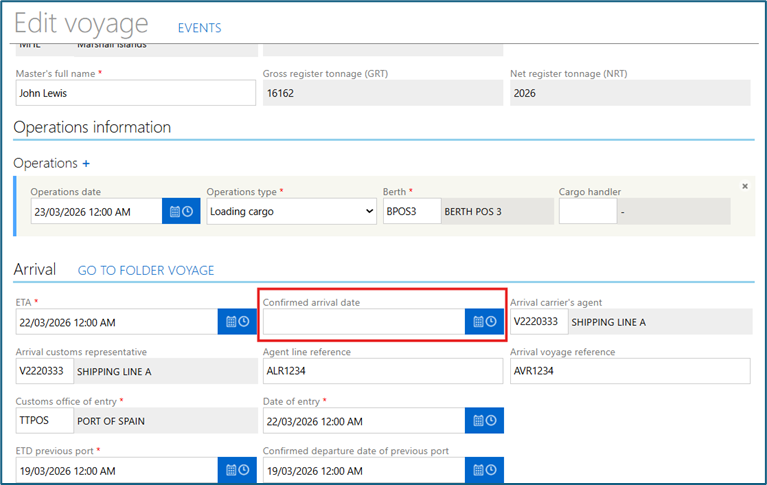
Once the vessel arrival is confirmed, the system automatically generates a proforma invoice based on specific vessel parameters, such as type of vessel, purpose of visit and number of confirmed voyages. When the proforma invoice is generated, a new shortcut will appear in the maritime folder to facilitate easy navigation to the corresponding invoice. Click “Access Invoice Folder” to be redirected to the invoice details

As the navigational aids dues is currently the only payment managed by the PCS, it is the only invoice type listed in the invoice folder. Each invoice is assigned a unique reference number in a standard format: the prefix “NAV” followed by a 10-digit numeric sequence (e.g.NAV1234567890).
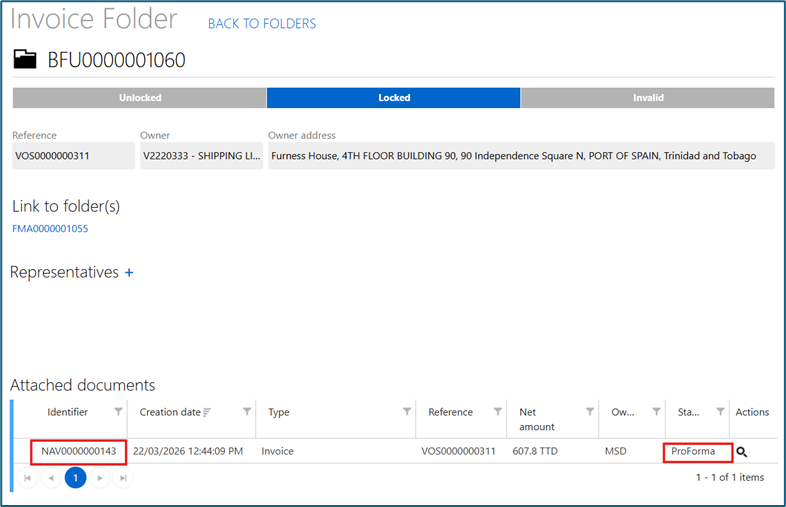
In the case that the system has determined that the navigational aids dues may be exempted based on the parameters set, the invoice status will state “Exemption pending”.
