Looking for help?
Manage Invoices
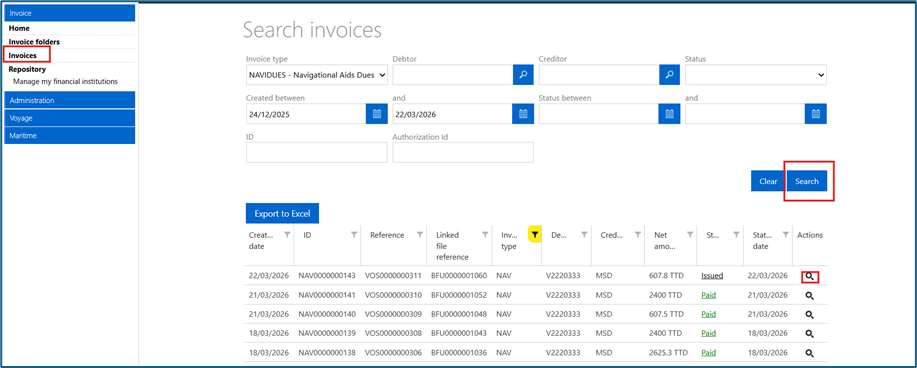
The various invoices associated with your organisation can also be accessed via the Invoice module. Select the “Invoices” option in the navigation menu to view a list of all the invoices associated with your organisation. From the “Invoices” screen you can:
- Click the magnifying glass icon to view an invoice
- Click on a column heading (Creation Date, ID) to sort the list of records displayed in ascending or descending order of the column. By default, records are displayed in descending order by date created, placing the most recent records at the top.
- Click the filter icon in the column heading to use filters on that heading.
- Use the search criteria to retrieve a specific invoice
- Click “Export to Excel” to export all the search results as an Excel File.
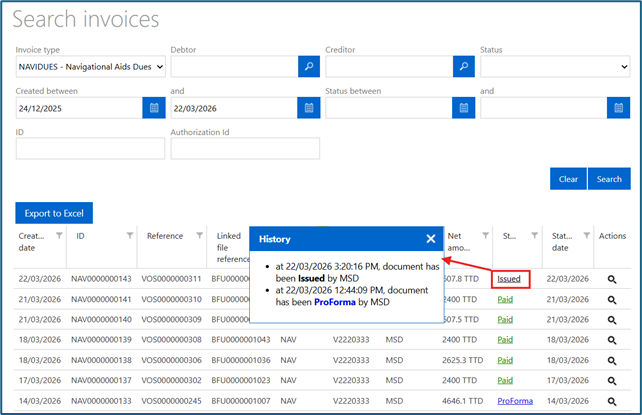
Click the invoice status to view the status history.